

I recently did some leadership coaching with Reach Australia. It was fantastic! Scott, my coach, challenged me to clarify my core values, focus on outcomes that align with them, and purposefully structure my week to reflect those priorities.
Here’s a calendar workflow I developed. It works by using Apple Calendar to align your weekly schedule with your core values. Instead of simply listing tasks or appointments, you organize your calendar around your areas of responsibility and higher-level goals.

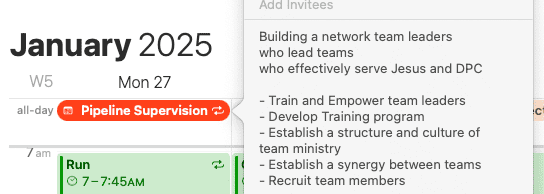
Here’s a summary of how to set it up so you can see the final result. Keep reading after that for the thought process behind it.
Summary
1. Create Dedicated Calendars for Each Priority


You begin by setting up separate calendars in Apple Calendar for your main areas of focus and responsibility (Example: “Health & fitness,” “Family relationships,” “Church leadership.”) Each calendar represents a core area in your life.
Color coding each calendar will allow you to easily see in your weekly where your time is being spent each week.
2. Use All-Day Events to display areas of responsibility


The next step is to add your key priorities or areas of focus to the top of your calendar. (You can do this by creating a recurring all-day event!) This creates a constant visual reminder of what matters most.
3. Include Vision and Goals:


You can use the notes section of these all-day events to outline the vision and strategic goals for each area. This keeps your long-term objectives front and center – just a click away – without having to open a different app.
4. Time Blocking by Priority:

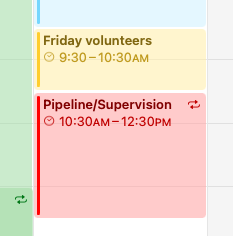
Now you can schedule blocks of time throughout the week for each area of responsibility where you will focus solely on tasks or activities related to that priority. This ensures that each area gets consistent attention. (Putting them in the right calendar for each area automatically color-codes them.)
5. Reflect and Adapt:

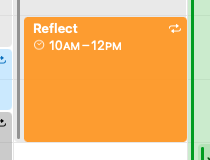
Include time in your week to reflect. Refer back to your values and vision. Adjust your time blocks as needed to accommodate any changes.
This method of top-down planning shifts the focus from completing tasks to intentionally living out your values, ensuring your week is shaped by what truly matters rather than by what feels urgent.
My Story – the transition from GTD to purpose driven planning
I recently did some leadership coaching with Reach Australia. It was fantastic! Among other things, Scott, my coach, challenged me to get away from just using a to-do list and focus on outcomes. There’s nothing wrong with a to-do list I still use one. But you can’t effectively plan your time around a list of tasks. The Reach Australia framework shifts the focus from inputs (a to-do list) to key outputs. Start with the end in mind. On a personal level this means identifying your main roles in life, and the goals in those areas, and allocating time each week based on those.
Using a calender seems easy. Not so for me. When I first started implementing this it was a lot harder than I anticipated. I would define my goals and plan my week accordingly. But the moment I became overwhelmed or stressed, I would revert back to my to-do list. My goals would go out the window. I would then go from task to task, working hard, getting jobs done, but losing the big picture and so inevitably dropping important things. After 20 years of bad habits, my poor old coach Scott was tearing his hair out at times. When overwhelmed, my default coping mechanism was simply to do more. The more I did the better I felt.
The problem with this is that the things that I dropped were usually relational things like meeting with people, strategic things like reflecting and planning, and rest and family time. This needed to change. The coaching aspect of the Reach Australia development program played a key role in this. I was meeting with my coach monthly, and when the wheels fell off, and my calendar had fallen out the window, he would help me to reflect on my outcomes and reset again.
Breaking Old Habits
After about 18 months of trying to use a calendar, a repeated cycle of success then failure, something clicked, something changed.
My reflex response to stress completely shifted. Instead of instinctively diving into more tasks when overwhelmed, I found myself automatically stepping back to evaluate the bigger picture.
What a dramatic change! Three years ago, when I was overworked I became busier with less direction. Now when I start to feel stressed and unclear about what I’m doing I stop and reflect. I make sure I do what’s important and let go of what is less important. I was always trying to do this, but now, after training, it’s become somewhat of an instinctive reflex. It took 2 to 3 years for this deep change to fully take hold.
Planning around Priorities


Here’s a more in-depth explanation.
I now use a weekly planner where I have time allocated to the areas of responsibility that I need to attend to. If I have 2 hours a week allocated for example to, ‘Magnification’, then I will spend two hours a week on that, and if I don’t get my tasks finished in that area, I will park it there until next week. This means that everything is getting attention each week, and no single area gets neglected, even during busy times. I divide up my week according to which areas are strategically important and allocate time accordingly. (I’m somewhat embarrassed by some of my actual goals and plans, I have trouble writing them clearly, but you get the idea!)
Using Apple Calendar Effectively
The practical solution was to adapt Apple Calendar to ensure my week is explicitly guided by my priorities, with my values always in clear view. I need a clear system as this level of planning is not my default mode of operation.
Here’s a step-by-step guide on how I did it:
1. Create areas of responsibility as Calendars
The first part of the solution was to create a separate calendar for each area of responsibility in my life. (This is what Dave Allen in GTD would call the 20,000 feet view.)
Here’s what such a list may look like. There are a few extras here in my list, but you can see my main roles. Preaching, Leading, Rest, Pipeline, Care, Sundays. Church@6 Focus, Senior Pastor Roles, Family and Other. You want one calendar for each role or area of responsibility in your life.

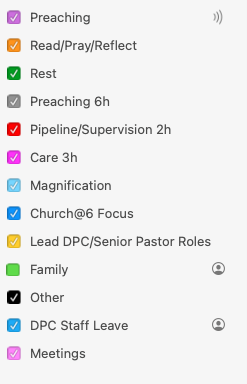
I used iCloud to sync these calendars so they sync to my phone. So they appear under ‘iCloud’ not ‘On My Mac.’
2. Add these areas of responsibility to your calendar as all-day repeating events.
Step 2 was NOT to add time blocks into my calendar, but rather to add an overview of each area to the top area of my calendar. I’m wanting to be reminded of my core outcome areas. The only way to do this in Apple Calendar is to create an all-day event that repeats weekly. It’s a bit of a hack, but it works perfectly!


Here’s what it looks like. There’s a recurring ‘all day’ event for each area, which means it appears in the top part of my calendar. I have one per day, so that they all sit along the top of the calendar as a permanent reminder of my areas of responsibility. I’m not assigning them to a day here, it’s just a place to see them clearly in the weekly view. So Monday is not ‘Pipeline and Supervision’ day. Monday is just where that heading sits. I limited my areas to 6 so that there’s one per day. Any actual all-day events will sit under these in the calendar.
3. Add a vision for each area.
Each all-day event has a ‘notes’ field. Here you can add your vision or outcomes for each area. (See ‘1’ below)

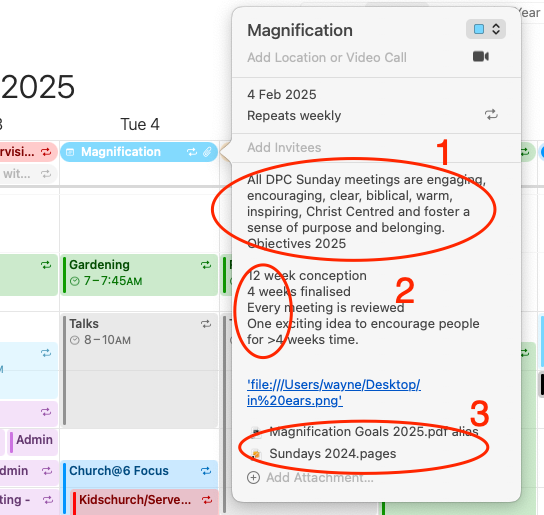
Below that I added some current strategic goals for that area (2)
At the very bottom, I linked to the planning document for that area. (3)
(There’s a trick to this, see here)
Now I can click on any area and get a view like this.
4. Fill out your weekly calendar according to these areas.
I then allocate blocks of time for areas of responsibility. When that time arrives, I can grab my vision, or to-do list for that area and start work.
Here’s what a blank weekly plan looks like:


The colors represent areas of responsibility. Some are in larger blocks, to allocate good thinking time. Others are spread out, do do shorter bursts. The main thing is that I’m now directed to my responsibilities, not to-do lists.
Priorities are at the top every week. I can click on them to be reminded of them which I do regularly!
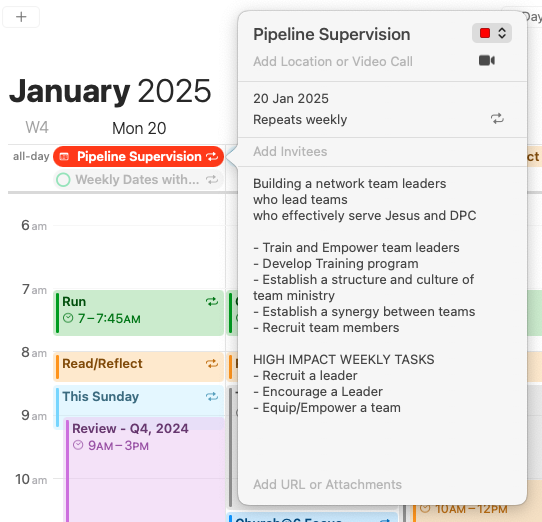
Here are some more examples of the kinds of things you can add to the ‘area of responsibility’ area. Some are a vision type statement, or a ‘High Impact Weekly Task’ in area, a goal, etc.


Example of another area:


Another Example:

A final word
I’ve read many books on planning and management techniques, Steven Covey, Dave Allen, I’m a fan of Patrick Lencioni, etc. I’ve tried to improve my ‘time management’ before, but the key that made this change ‘stick’ was to have a coach, in my case for approx 2 years. I’m very thankful to the Reach Australia Development Program, which is specifically aimed at church leaders. But if you struggle with time management, I’d encourage you to get a coach in whatever field you are in.
I hope that’s useful, feel free to leave a comment below!


Leave a Reply Cancel reply