
There are 3 categories of USB-C cable:
- A charging cable
- A data cable
- A thunderbolt cable
Here are some speed tests of an external Samsung T5 drive with 3 different cables.
A cheap ($10) charging-only cable.
~40 MB/s
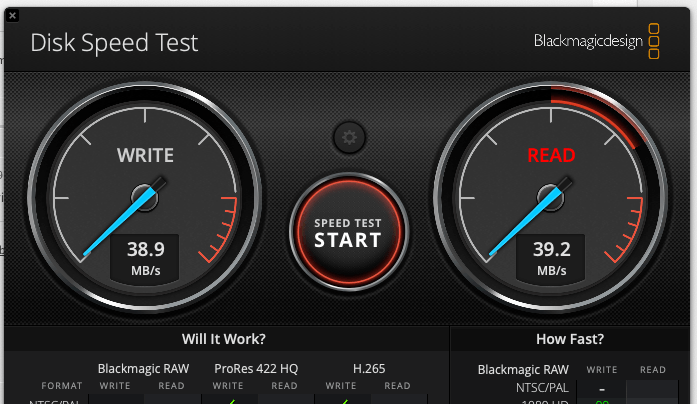
Clearly the slowest of the cables. 1/10 the speed of a proper USB-C cable.
A USB-C charging + data cable ($25).
~400MB/s
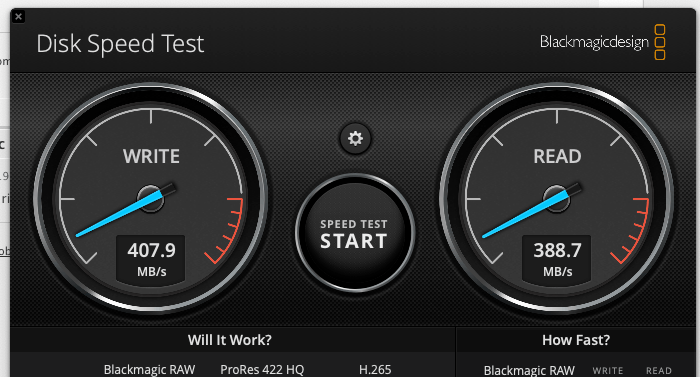
A standard USB-C cable can achieve fast USB transfer speeds for an external hard drive. This cable was marketed as ‘USB-2 data speeds up to 480Mbps’ These cables can still be called ‘charging cables’ make sure they say they are USB-2 standard which means 480Mbps data rate.
Apple Thunderbolt 5 cable ($115)
~400MB/s
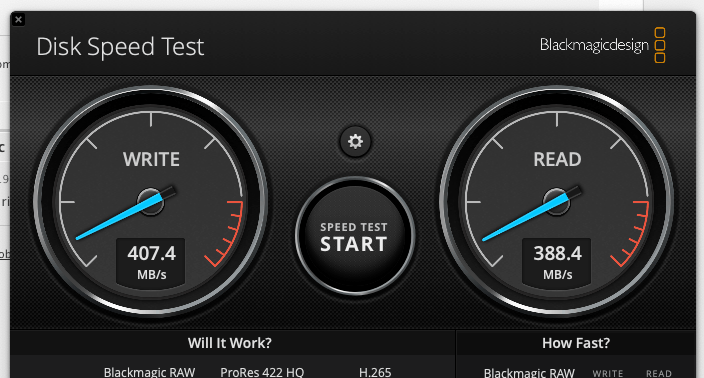
The fastest cable avaialble, Apple’s thunderbolt 5, is no faster here because the External Samsung drive is only capable of USBC-2 speeds.
A Thunderbolt cable is only of use when the external device (a storage device, graphics capture card, or another macboook) also has a thunderbolt port.
CONCLUSION: If you are just hooking up an external USB drive, there’s no added speed benefit from having a thunderbolt cable.


Leave a Reply