

For years I’ve not quite been happy with how the function keys on the MacBook work.
Generally, I want to use F1 & F2 to adjust the brightness, and F11 & F12 to adjust the volume. This is called media control mode when you control brightness etc with function keys.
But I also love the ‘style’ feature of Apple Pages where I can assign a style to a traditional function key (so that pressing the function key will apply a style to a paragraph). This is called function key mode when you use the function keys in applications to do certain things.
The options in OSX preferences allow you to use the function keys in one of these 2 ways, but not both. They all act as media controls, or they all act as function keys. (The only exception is that when in media control mode, there are 2 function keys available to use as function keys – F5 and F6.)
Using function keys only in some apps
Today I stumbled upon a fantastic application called Fluor that allows you to choose which mode the function keys operate in based on which application is open!
I’ve set it so that the default mode is media control mode but when Apple Pages is open it changes to Function key mode and allows me to select styles with the function keys. So simple!
This means when Apple Pages is open the brightness and volume controls do not work, but I can access all the function keys as shortcuts for the document paragraph styles.
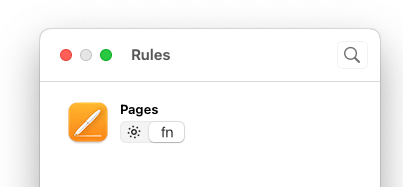
Here’s what the rule looks like to set Pages to use Function keys instead of media control:


Leave a Reply